Containers VS Virtual Machines
Two of the most powerful and widely-used technologies in modern infrastructure are Virtual Machines (VMs) and containers. Both have transformed how businesses deploy applications, and they are routinely presented as competitors — the heavyweight old guard versus the lightweight upstart. That framing misses the more useful truth: they are different isolation mechanisms, built on entirely different kernel and hardware primitives, with different security properties that follow directly from that construction. Understand what each one actually is, and the "which should I use" question mostly answers itself.
What Virtual Machines Actually Are
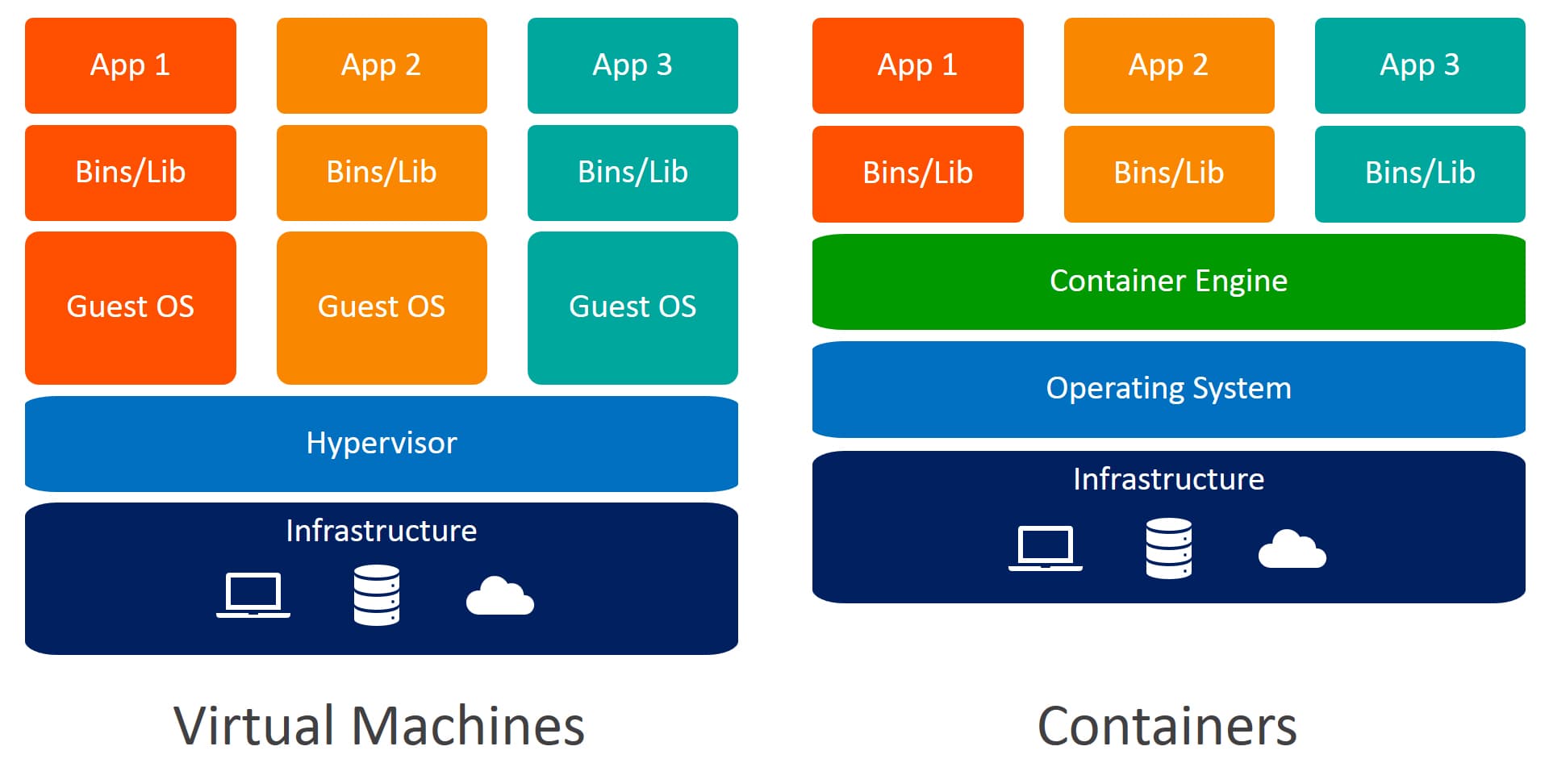
A virtual machine is an emulation of a physical computer, managed by a hypervisor — but the word "emulation" undersells how it works. Modern hypervisors (KVM, VMware ESXi, Hyper-V, Xen) don't interpret the guest's instructions; the guest's code runs directly on the physical CPU, using hardware virtualization extensions (Intel VT-x, AMD-V) that add a privilege level below the operating system. The guest OS believes it is managing real hardware; in reality, the CPU traps its privileged operations and hands them to the hypervisor, and memory is translated through a second layer of page tables (EPT/NPT) so the guest's "physical" memory is itself virtual.
Two consequences follow from this design. First, each VM must carry a complete operating system — kernel, init system, system services — because the abstraction being offered is hardware, and something has to operate that hardware. This is where the VM's famous weight comes from: gigabytes of disk, hundreds of megabytes to gigabytes of RAM consumed before the first application byte, and boot times measured in tens of seconds. Second, the attack surface between guest and host is extremely narrow: for malicious code in a VM to affect the host or a neighboring VM, it needs a hypervisor escape — a vulnerability class so rare and valuable that individual exploits command six-to-seven-figure prices. This is why every major public cloud is willing to run different customers' workloads on the same physical machine separated only by a hypervisor.
There is a distinction worth knowing within the category: Type 1 hypervisors run directly on hardware (ESXi, Hyper-V, Xen — and KVM, which turns the Linux kernel itself into a hypervisor), while Type 2 hypervisors run as applications on a host OS (VirtualBox, VMware Workstation). Production infrastructure is Type 1; your laptop's test VM is usually Type 2.
What Containers Actually Are
Here is the sentence that reorganizes most people's mental model: a container is not a lightweight VM — it is a regular Linux process with a restricted view of the system. There is no guest kernel, no hypervisor, no virtual hardware. Every process in every container on a host is scheduled by the same host kernel and visible in the host's process table. "Container" is not even a kernel object; it is a convention assembled from three kernel features:
- Namespaces control what a process can see. The PID namespace gives it its own process numbering (its main process believes it is PID 1); the network namespace gives it its own interfaces and routing table; the mount namespace gives it its own filesystem tree; UTS, IPC, and user namespaces round out the illusion of a private machine.
- Cgroups (control groups) control what a process can use — hard and soft limits on CPU, memory, I/O bandwidth, and process count. When a container "has 512 MB of memory," that is a cgroup limit, and exceeding it summons the kernel's OOM killer for that group alone.
- Union filesystems (OverlayFS) make images practical: a container image is a stack of read-only layers, with a thin writable layer on top per container. Fifty containers from one image share the same underlying bytes — this, plus the absent guest OS, is why a container starts in milliseconds and a VM in minutes.
The startup speed and density numbers that made Docker famous are downstream of one fact: starting a container is starting a process, with some bookkeeping. There is no OS to boot because there is no OS inside — just your application, its dependencies, and a kernel it borrows from the host.
The Security Line, Precisely Drawn
The shared kernel is the entire security story. The Linux kernel is tens of millions of lines of code exposing hundreds of syscalls, and every container on a host can talk to it directly. A kernel privilege-escalation vulnerability — a class of bug discovered routinely, several times a year — is potentially a container escape. Compare the boundaries honestly: escaping a VM requires defeating a hypervisor whose entire interface is a handful of hardware-mediated operations; escaping a container requires defeating a kernel whose interface is the largest attack surface in computing.
Container security in practice is therefore about narrowing that shared-kernel exposure: seccomp profiles that block unused syscalls, dropped capabilities (the fragments of root privilege — a container that doesn't need CAP_NET_ADMIN shouldn't have it), read-only root filesystems, non-root users inside the container, and mandatory access control (SELinux/AppArmor) around the runtime. These measures are genuinely effective, and a well-hardened container is a respectable boundary — but it is a hardened door in a shared wall, not a separate building.
This is also why the interesting recent technology lives between the two categories. Firecracker (which runs every AWS Lambda function and Fargate task) is a minimal hypervisor that boots stripped-down microVMs in about 125 milliseconds with a few MB of overhead — VM-grade isolation at near-container speed, built precisely because AWS was unwilling to run untrusted multi-tenant code behind only a kernel boundary. Kata Containers wraps each container in a lightweight VM while keeping standard container tooling; gVisor interposes a userspace kernel that absorbs syscalls before they reach the real one. When someone asks whether containers or VMs are "the future," the honest answer is that the highest-scale systems in the world now use both at once, in the same product.
Which to Use When
Full Isolation Needed
Use VMs (or microVM-wrapped containers) when workloads must not trust each other: multi-tenant platforms running customer code, regulated environments where the compliance boundary must be defensible, security research and malware analysis. The hardware-mediated boundary is the point, and the resource overhead is the fee.
Why not plain containers? Because "the workloads must not trust each other" and "the workloads share a kernel" are in tension. Hardening narrows the gap; it does not close it. If a tenant escaping to the host is a company-ending event, rent them a kernel of their own.
Maximizing Density and Elasticity
Use containers when you control all the code on the host and the goal is packing and speed: microservices, CI runners, batch workers, anything autoscaled. The economics are not subtle — replacing per-workload guest OS overhead with per-workload process overhead routinely doubles or triples achievable density, and millisecond starts change what autoscaling can even mean. A VM cannot join a load balancer pool in 800 ms; a container can.
Why not VMs? Every VM you add spends RAM and CPU on another copy of an operating system doing nothing distinctive. At fleet scale that overhead is a standing tax on every host — and slow boot forces you to keep warm capacity idling, which is the same tax in a different ledger.
Development and Delivery Consistency
Use containers as the packaging format almost unconditionally, even where the runtime decision goes the other way. An image built in CI is a content-addressed, immutable artifact — the same bytes in the developer's laptop test, the staging environment, and production. This kills the "works on my machine" class of failure at the artifact level, which no amount of VM template discipline quite matches (golden images drift; image digests don't). It is telling that the modern VM-based platforms increasingly run containers inside VMs — packaging from one world, isolation from the other.
Legacy and Mixed-OS Environments
Use VMs for what containers structurally cannot do: run a different kernel than the host. Windows applications on a Linux fleet, that vendor system certified only on an old OS release, kernel-module-dependent software, appliances delivered as VM images. A Linux container requires a Linux kernel — "Windows containers" exist but require Windows hosts, and cross-OS "containers" on developer laptops are containers running inside a hidden Linux VM (which is exactly what Docker Desktop does).
Why not containers? Not for lack of trying — but a monolith that assumes a full init system, writes throughout its filesystem, and expects to be "a server" fights the container model at every step. Lift-and-shift it into a VM, and containerize what you build next.
Conclusion
Strip away the marketing history and the comparison becomes clean: VMs virtualize hardware, so they carry an OS and buy you a hardware-enforced boundary; containers virtualize the operating system's view of itself, so they carry almost nothing and buy you density and speed against the cost of a shared kernel. Neither is the successor to the other — your cloud provider is running your containers inside their VMs right now, and technologies like Firecracker exist because the industry wanted both halves of the trade at once. The practical questions are the ones that cut along the real boundary: Who else is on this host, and do I trust them? Does this workload need its own kernel? Is my bottleneck isolation, or density? Answer those, and the technology picks itself.

I write cool blogs about devops, AI, networking, software, and security. I hope you enjoy!